Let me be upfront: most “free AI voice generator” lists are full of platforms that are free in name only, becoming practically useless unless you hand over a credit card. I have cut through the marketing copy and spent real time testing what you can genuinely accomplish without spending a dollar.
Some of these platforms are legitimately free—offering no watermarks, no forced trials, and zero cost. Others feature highly generous free tiers that easily cover casual or entry-level use cases. I have also included a few open-source pipelines that require technical setup but hand you complete ownership of your synthetic data.
The following platforms are what actually deliver results in 2026.
The Best Free AI Voice Generators (Tested & Ranked)
1. ElevenLabs Free Tier — Best Free Audio Quality
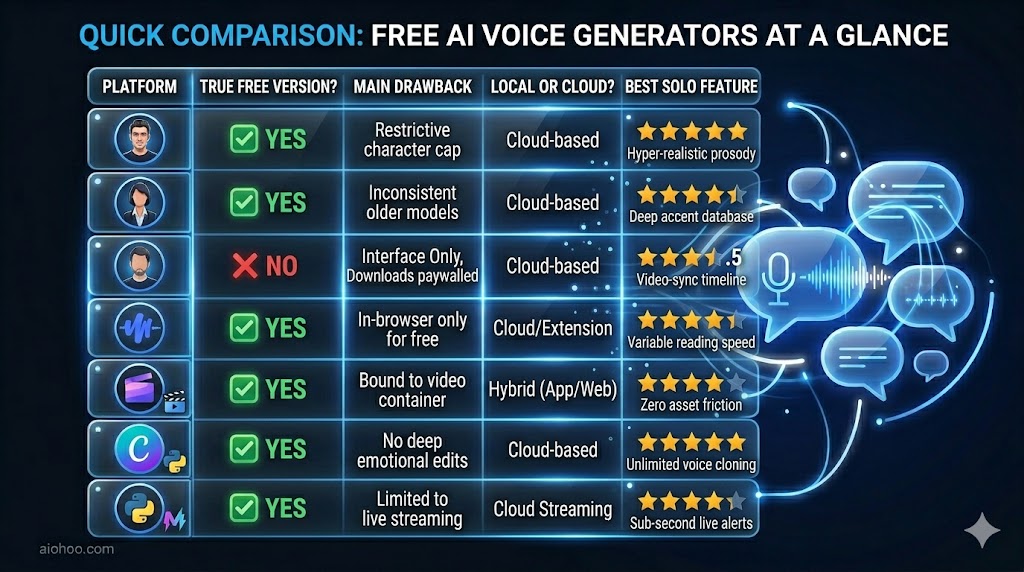
ElevenLabs’ free tier does not compromise on synthesis quality. Free users gain access to the exact same neural rendering engines and high-fidelity models as paid subscribers—gated strictly by a monthly character limit.
- The Free Allocation: 10,000 characters per month (translates roughly to 5–7 minutes of compiled audio).
- The Core Mechanics: It consistently outclasses competitors when handling complex sentence structures, maintaining a steady conversational rhythm where older text-to-speech engines traditionally warp or falter.
- The Limitation: 10,000 characters disappears quickly, tracking out to about 1,700 words. Furthermore, commercial monetization rights are withheld on the free tier.
Technical Details:
- Download Format: MP3
- Commercial Rights: No (Personal use only)
- Best For: Prototyping scripts, voice testing, and short-form social content.
2. PlayHT Free Tier — Most Generous Limits
If you prioritize raw output volume over hyper-nuanced emotional expression, PlayHT features one of the most practical free allocations on the market.
- The Free Allocation: 12,500 words per month alongside access to an expansive library of over 900 voices covering 142 distinct languages and localized regional accents.
- The Core Mechanics: Quality is highly model-dependent. To secure humanlike prosody, explicitly select the voices tagged “AI” or “Generative.” Legacy voices tagged “Neural” or “Standard” tend to sound distinctly synthetic.
Technical Details:
- Download Format: MP3, WAV
- Commercial Rights: No
- Best For: Multilingual audio experiments and high-volume text drafting.
3. Murf AI Free Tier — Best Workspace Interface
Murf AI treats its free tier as a functional, hands-on production studio demonstration environment rather than an endless free creation tool.
- The Free Allocation: Unlimited access to the entire studio interface, full voice library auditioning, and real-time script previewing.
- The Limitation: Audio downloads are locked entirely behind their premium paywall. To export your project as an independent file, an upgrade is mandatory.
- The Workflow Advantage: Despite the download gate, it is an invaluable educational sandbox. The studio timeline lets you import video files and snap voiceover text blocks directly to visual cuts inside your browser, making it the finest interface for mastering professional audio-to-video alignment workflows.
Technical Details:
- Download Format: Gated behind premium upgrade
- Commercial Rights: No
- Best For: Project mapping, workflow onboarding, and platform testing.
4. Speechify — Best for Personal Reading & Productivity
Speechify is engineered as a content consumption system rather than a content production engine. It is built to turn flat, written documents into dynamic, audible learning sessions.
- The Free Allocation: Unlimited web-text reading via their native Google Chrome desktop extension, paired with a foundational suite of standard reading voices.
- The Core Mechanics: By highlighting any article, PDF, or text block online, the engine reads it back to you in real time. While the free tier lack the cinematic depth of ElevenLabs, it performs flawlessly for consuming dense articles or proofing scripts at accelerated playback speeds (up to 2x or higher).
Technical Details:
- Download Format: N/A (Streaming web playback)
- Commercial Rights: Not applicable
- Best For: Auditory learning, workflow productivity, and script proofreading.
5. Clipchamp (Microsoft) — Best for Integrated Desktop Video
Clipchamp is Microsoft’s built-in, web-fluent video editing software. Because it is tied directly into the Windows ecosystem, it features excellent access to Microsoft’s deep learning text-to-speech engines.
- The Free Allocation: Fully unlimited text-to-speech engine generation, integrated directly inside a video editing timeline, supporting up to 30 minutes of high-definition video exports per month.
- The Core Mechanics: The voices leverage Microsoft’s robust Azure neural network infrastructure. They sound exceptionally stable, confident, and professional—ideal for clean, informative explainer videos or software guides.
Technical Details:
- Download Format: MP4 (Exported as part of a compiled video file)
- Commercial Rights: Yes (Subject to reviewing active Microsoft software terms)
- Best For: Creating narrated videos quickly without jump-cutting between standalone audio platforms and video editors.
6. Canva Text to Speech — Best for Fast Social Media Assets
Canva includes native neural text-to-speech capabilities directly within its multi-media design workspace, providing a zero-friction audio layer for visual designers.
- The Free Allocation: Full access to standard neural narration tools directly inside presentation and social media video templates.
- The Core Mechanics: The voice properties are clear, corporate, and highly consistent. While it lacks deep emotional controls or custom pronunciation dictionaries, it is optimized to generate quick, engaging audio hooks for slide decks and fast social assets.
Technical Details:
- Download Format: MP4 (Video format), MP3 (Gated behind Canva premium accounts)
- Commercial Rights: Permitted under standard Canva user licensing agreements
- Best For: Social media managers and graphic designers who want to keep audio and video assets in one single platform.
7. Coqui TTS — Best Open-Source, Unlimited Pipeline
For developers, power users, and data privacy purists, Coqui TTS is an open-source deep learning framework. Though the parent corporate entity closed, the project is actively sustained by the open-source community under dedicated institute forks (such as Idiap).
- The Free Allocation: 100% Free. No character ceilings, no monthly subscriptions, and no external API reliance. It runs completely locally on your machine.
- The Core Mechanics: Utilizing top-tier foundational models like XTTSv2, it supports rapid voice cloning from reference audio files across 17 different languages.
- The Technical Catch: It lacks a standard graphical app wrapper. Setup requires localized comfort installing Python dependencies, initializing libraries via command lines, and managing your system’s hardware resources.
Technical Details:
- Download Format: WAV, MP3
- Commercial Rights: Yes (Framework uses an Apache 2.0 / MPL 2.0 license; individual foundational model terms must be verified)
- Best For: Software developers, automated systems, and creators running high-performance local GPUs.
8. TTS Monster — Best for Live Streamers & Gaming
TTS Monster targets a highly specific, real-time interactive ecosystem: live broadcast creators on platforms like Twitch and YouTube.
- The Free Allocation: A robust tier providing standard AI voices that integrate directly with major streaming control decks like Open Broadcaster Software (OBS), Streamlabs, and Streamelements.
- The Core Mechanics: Unlike static creators who render audio scripts beforehand, this tool processes text instantly on-the-fly—allowing your live chat events, viewer alerts, or donor messages to be vocalized in real-time without stalling your broadcast stream’s latency.
Technical Details:
- Download Format: Real-time web audio streaming integration
- Commercial Rights: Permitted for digital streaming broadcasts
- Best For: Twitch streamers, live gamers, and community managers.
Technical Feature Grid Comparison
Understanding the Hidden Boundaries of Free Tools
When managing a budget-conscious workflow, keep these industry-standard paywalls in mind:
- Commercial Exploitation Rights: Using a free audio asset inside a monetized environment (such as an AdSense-supported YouTube channel, a sponsored podcast block, or premium client work) frequently violates free-tier terms. Check the licensing agreement to avoid copyright flags.
- Voice Cloning Constraints: Duplicating a specific, custom human voice profile requires considerable cloud processing power. Almost all major web platforms paywall voice cloning features behind their starter or premium tiers.
- Acoustic Artifacts: Premium tiers often utilize advanced, computing-heavy neural models. Free tracks occasionally employ lighter models, which can result in digital pops, mechanical tracking sounds, or subtle pronunciation drift over extended paragraphs.
Workflow Optimization: Extracting Human Realism From Free AI Tools
To maximize the performance of your text-to-speech processing without paying for micro-adjustments, implement these five structural editing techniques:
- Write for the Ear, Not the Eye: Neural networks mimic human speech patterns. Break complex text down into colloquial structures. Use conversational contractions (“It’s,” “Don’t,” “They’re”) instead of rigid phrasing (“It is,” “Do not,” “They are”) to instantly soften the digital output.
- Over-Engineer Punctuation: Treat text punctuation as structural stage directions. A comma signals an acoustic breathing break, double hyphens (–) or em-dashes construct a natural pause for emphasis, and question marks prompt the algorithm to naturally ramp up vocal pitch at the end of a sentence.
- Chunk Your Scripts: Processing a massive, uninterrupted multi-page script in one go increases the probability of voice drift or unexpected pitch warping. Segment your scripts into concise, focused paragraphs, render them individually, and stitch the clean files together in post-production.
- Isolate Technical Acronyms: If your script relies on industry jargon or unusual proper nouns, write them phonetically in your editor to prevent spelling confusion (for example, typing out “text to speech” directly if the model continuously stumbles over the acronym “TTS”).
- Always Run Multi-Device Previews: High-end studio headphones can occasionally mask audio anomalies. Before finalizing a project, run your generated files through basic phone speakers or stock computer monitors to ensure the audio remains perfectly intelligible across all standard consumption environments.
Final Recommendation
For creators looking for raw realism, start by testing a script block on ElevenLabs. If your workflow demands high-volume text conversion without strict quality parameters, pivot to PlayHT. For tech-fluent creators seeking complete offline privacy and limitless volume, setting up an open-source Coqui TTS pipeline using an active community fork offers a powerful, lifelong local solution.
Related Analysis Links: